How it works
Help on the page, under your control.
PlatoKit brings Chat, Plato, and focused tools to the webpage you are already using. It starts when you click your PlatoKit bookmark, and page access stays limited to a fixed set of visible controls.
The whole routine: drag one bookmark to your bookmarks bar, click it on a page when you want help, and choose what that page may share.
The experience
What happens when you click.
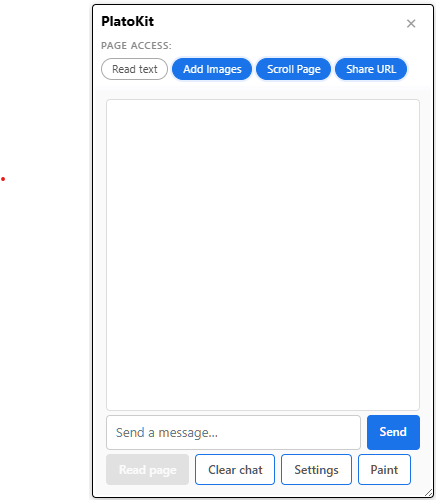
- 1Chat opens on the page.A small panel appears on the webpage you are reading, with Plato ready to mark up what you see. Nothing opens until you click.
- 2You decide what it may use.Four visible controls sit in the panel — Read text, Add Images, Scroll Page, Share URL. Read text starts off.
- 3Tools work through your bookmark.Chat and Plato can only ask for the page actions already saved in the bookmark you installed — nothing more.
- 4The model you chose answers.Your question, plus only the context you allowed, goes to the model you picked — cloud, connected, or local.
Everything below is this same story in more detail. Stop whenever you know enough.
What you install
A bookmarklet, not a browser extension.
A bookmarklet is a bookmark whose address contains JavaScript. Clicking it runs that saved code in the current tab instead of taking you to a new page. Nothing happens on pages where you never click it, and nothing installs into the browser itself.
Should you trust every bookmarklet?
No. A bookmarklet can act on the page where you click it, so install one only from a source you trust, and only after its behavior is clear.
What PlatoKit does differently
PlatoKit puts every action that can touch a page — reading text, adding visuals, scrolling, sharing the address — inside the bookmark you install. We call this fixed code the Anchor. Everything friendlier that you interact with, like Chat and Plato, works by asking the Anchor for one of those actions, and the Anchor checks the visible controls before agreeing.
That split is the point: Chat and Plato can improve without a reinstall, but they can only request actions already saved in your bookmark. Giving PlatoKit genuinely new page access requires a new build and a new install — a deliberate step you take, never a silent update.
Your control
Four clear page controls.
The default PlatoKit install is useful without reading the page. Read text starts off. The other three controls start on, and all four remain visible whenever PlatoKit is open — each one names exactly what it allows and what can leave the page through it.
Your data and model
Choose what is shared, then choose where it goes.
Page access and model choice are separate decisions. Turning on Read text does not choose a provider, and choosing a model does not turn on Read text.
A cloud model receives your message and the context you deliberately shared; its provider's terms apply. A connected service is one you set up yourself through the Hub, which should show its destination before you use it. A local model can keep requests on your own device — and the interface must say whether it runs inside the browser or as a local service, because those are different privacy claims.
One honest detail worth knowing: text you type into Chat is sent to the active model when you press Send, even while Read text is off. Read text controls page-derived context, not the words you deliberately type.
The Hub and support windows
More room when a small panel is not enough.
The PlatoKit Hub is the settings and tool space behind the page panel. It can hold model choices, connected services, and more capable tools without crowding the webpage you are working on, and it may open in a separate tab so it stays configured while you return to the page.
On a page with stricter browser rules, PlatoKit may also keep its working interface in a support tab or window and show a live image of it on the page. How the panel is delivered can change; what it is allowed to do cannot. The bookmark you installed remains the limit on page access either way.
A browser can require a visible click before opening or focusing another window. PlatoKit does not treat a blocked popup as permission to work around the browser.
Common questions
What people usually want to know.
Does PlatoKit read every page automatically?
No. PlatoKit starts when you click its bookmark in a tab. In the current default install, Read text starts off.
Can tools add more access later?
No. They can request only the actions already saved in the installed bookmark. New page access requires a new build and reinstall.
Do Plato's marks change the website?
No. They are temporary, click-through visuals above the page. They do not edit the site's stored content or take over its links and buttons.
Can I keep it local?
Use a verified local model when available. A cloud model, a model running on your device, and a model running entirely inside the browser are different privacy choices, and PlatoKit should label them clearly.
Why can the panel stay active after I close it?
The close button currently hides the panel so a second bookmark click can restore the same conversation and controls. Turn controls off before hiding when needed; navigating away or closing the tab ends that session on the page.
Does it work on every possible page?
It is intended for normal webpages in supported desktop browsers. Browser settings pages, extension stores, and some protected screens do not allow bookmarklets to run.
Use it deliberately
Page-level tools have real limits.
An unsafe webpage or browser extension can interfere with code running in a page. PlatoKit does not turn an unsafe page or browser into a safe one. On banking, health, password, or private work pages, leave Read text and Share URL off unless you understand which model is active and intend to share that information.
The practical promise is narrower: PlatoKit makes its page actions visible, keeps later tools within the fixed installed limit, and lets you choose when assistance appears.
Ready to try it?
Start with one page and one useful question.
The install button and live Plato demonstration are on the main page.